
How do I assign a work order to a vendor instead of employees?
Short answer
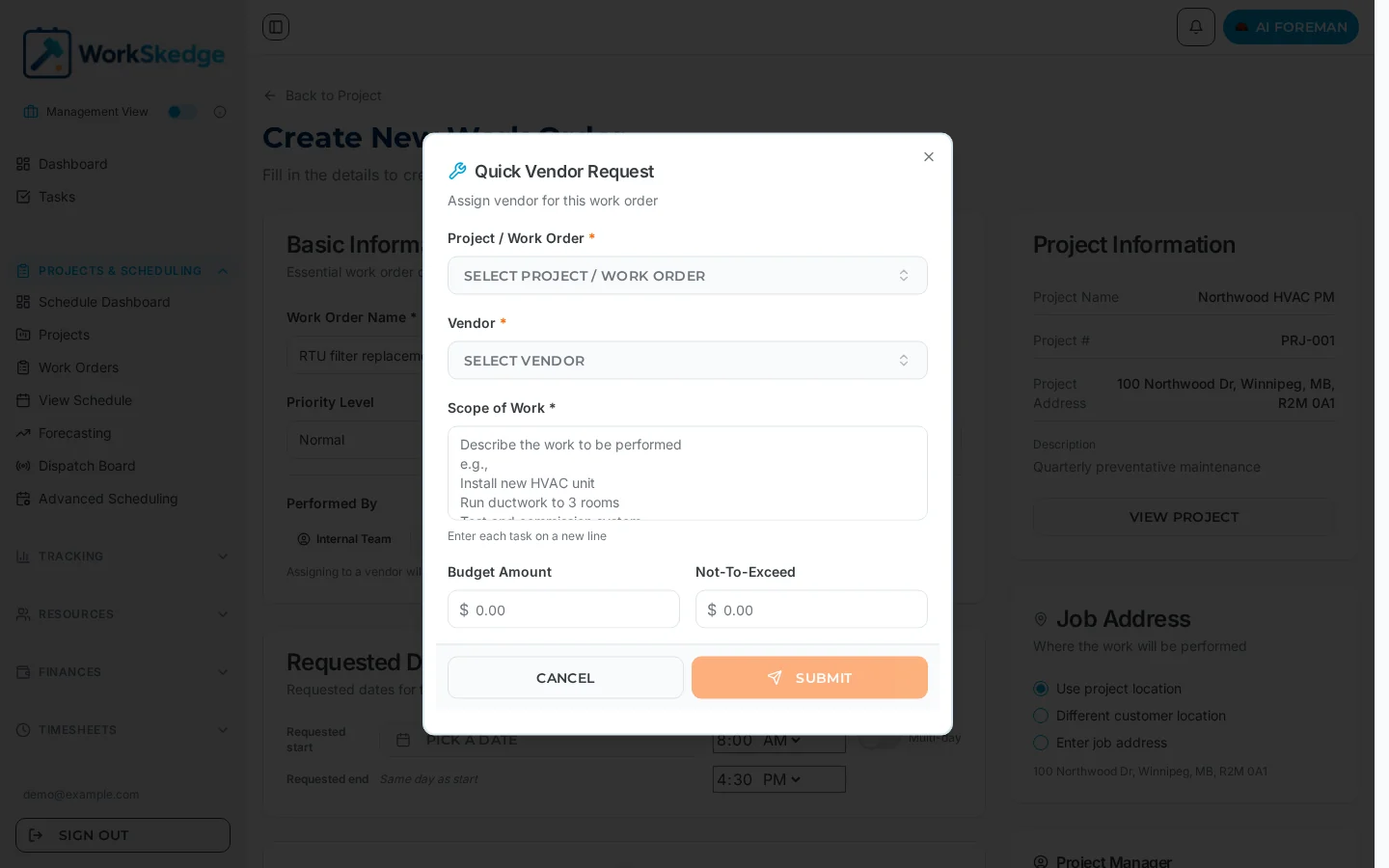
Set the work order's "Performed by" field to Vendor, pick an approved vendor from the dropdown, optionally attach a purchase order with a budget, and set the expected date range. The vendor manages their own people — no employee assignment is needed.
On this page
Some work is performed by subcontractors rather than your own crew. Setting a work order's Performed by field to Vendor hands the job to an approved vendor, skips employee assignment entirely, and lets you attach a purchase order so the vendor's cost is tracked against a budget.
Before you start
- The vendor record must exist and be in Approved status. Pending vendors cannot be assigned, and Expired vendors are removed from the assignment options.
- Insurance and compliance expiry dates should be current. Vendors expiring within 30 days show a yellow "Expiring in X days" badge and warn on assignment; past-expiry vendors show a red EXPIRED badge and cannot be assigned to new work orders.
- The work order must already exist on a properly set up project.
- Purchase orders are part of the Finances module — if it is not enabled on your tier, the PO fields will not be available.
Steps
- 1Open the work order form and set Performed by to Vendor
- 2Select an approved vendor (filter by trade specialty if needed)
- 3Optionally add a purchase order with budget and not-to-exceed amounts
- 4Set the expected start and end dates
- 5Save the work order
Assign a work order to a vendor
- Open the work order form (create or edit) and set Performed by to Vendor.
- Select the vendor from the dropdown. Only approved vendors appear; you can filter by trade specialty to match the work order type, and the list shows approval status and expiry warnings.
- Optionally create a purchase order: enter the PO number, budget amount, not-to-exceed amount, and any notes or terms.
- Set the timeline with expected start and end dates, coordinated with the vendor's availability.
- Save. No employee assignment is needed — the vendor handles their own resources, and internal employees are not assigned.
Vendor vs employee assignment
| Aspect | Employee assignment | Vendor assignment |
|---|---|---|
| Performed by | Employee | Vendor |
| Resource selection | Assign specific employees | Select the vendor from a list |
| People required | Specify count and skills | Not applicable |
| Timeline control | Detailed daily assignments | Expected date range only |
| Cost tracking | Internal labor costs | Purchase order with budget tracking |
| Conflict detection | Full conflict detection | None — the vendor manages their own resources |
Notes and limits
- A work order is either employee-performed or vendor-performed — not both.
- Vendor work orders do not appear as crew assignments, so they will not show up on the live dispatch board as staffed employee bars.
- Switching Performed by on an existing work order is captured in version history, so the change is auditable.
- Approval maintenance is manual: monitor expiry dates, request renewed certificates before they lapse, and update the documents and dates to keep the vendor Approved.
Common errors
- The vendor is missing from the dropdown — they are Pending (never verified) or Expired (documents lapsed). Complete verification or renew the documents and expiry dates.
- An expiry warning appears on save — the vendor's insurance or compliance date is within 30 days. It is a warning, not a block; request the renewal now.
- You cannot add a purchase order — the Finances module is not enabled for your billing tier.
- You expected conflict checking — there is none for vendor work. Coordinate dates with the vendor directly.
Related: work order statuses and lifecycle and create a work order.
Also useful: add a scope of work checklist, progress and completion reports and find, filter and export work orders.
Frequently asked questions
Why doesn't my vendor appear in the dropdown?
Only approved vendors are listed. Check the vendor's approval status — the list also flags approvals that are expired or expiring.
Do I need to create a purchase order for vendor work?
No, it's optional — but a PO lets you track the budget and not-to-exceed amount against the vendor's work.
Does WorkSkedge check vendor scheduling conflicts?
No. Conflict detection applies to employee assignments only; vendors manage their own resources.
Can I assign both employees and a vendor to the same work order?
A work order's Performed by field is either Employee or Vendor. Vendor-assigned work orders do not take internal employee assignments.
What makes a vendor eligible for assignment?
The vendor must be in Approved status (green). Newly added vendors start as Pending and cannot be assigned; vendors whose insurance or compliance dates have lapsed go to Expired (red) and cannot be assigned to new work orders until documents and expiry dates are updated.
Was this article helpful?
Still stuck?
Send us the article name and what you expected to happen.
Last verified August 30, 2026