
Construction scheduling automation
Construction Scheduling Software Built for Daily Chaos
Contractors battle daily scheduling chaos, unexpected disruptions, and the constant work of organizing crews while keeping customers informed. WorkSkedge combines live dispatch, advanced scheduling, employee management, work orders, time tracking, and AI-assisted draft planning so construction teams can build the next 7–14 days and recover when the day changes.
30-day demo site. No credit card. No sales call required.
One schedule for the people planning, dispatching, and delivering
Project managers
Plan multi-day work from the unscheduled queue, review draft scenarios, and keep customer dates tied to the real crew plan.
General contractors
Coordinate active jobs, available crews, live statuses, disruptions, and qualification requirements without rebuilding the board by hand.
Operations leaders
Use dispatch history, employee records, skills, time off, and forecasting to see the staffing pressure behind today’s work and future demand.
Live dispatch board
See today’s schedule before it turns into a phone tree
The Live Dispatch Board gives dispatchers a day-of operations cockpit with one lane per crew member. Work orders show live status — scheduled, en route, on site, running late, blocked, or done — so the office can see who is where, what is moving, and what needs attention.
- View one lane per crew member
- Spot running-late, blocked, and completed work
- See available crew with no schedule, approved time off, or blocking booking
Disruption recovery
Capture sick calls, no-shows, weather, and material delays in the schedule
When the day changes, WorkSkedge gives dispatch a structured way to log the reason. Sick calls, no-shows, material delays, permit holds, weather issues, and equipment breakdowns become gate signals that flag affected work and make recovery decisions easier to manage.
- Log disruption reasons with one click
- Flag blocked work orders before they create more confusion
- Review affected crews, conflicts, and customer dates from the same workflow

7–14 day planning
Build the next two weeks from an unscheduled queue
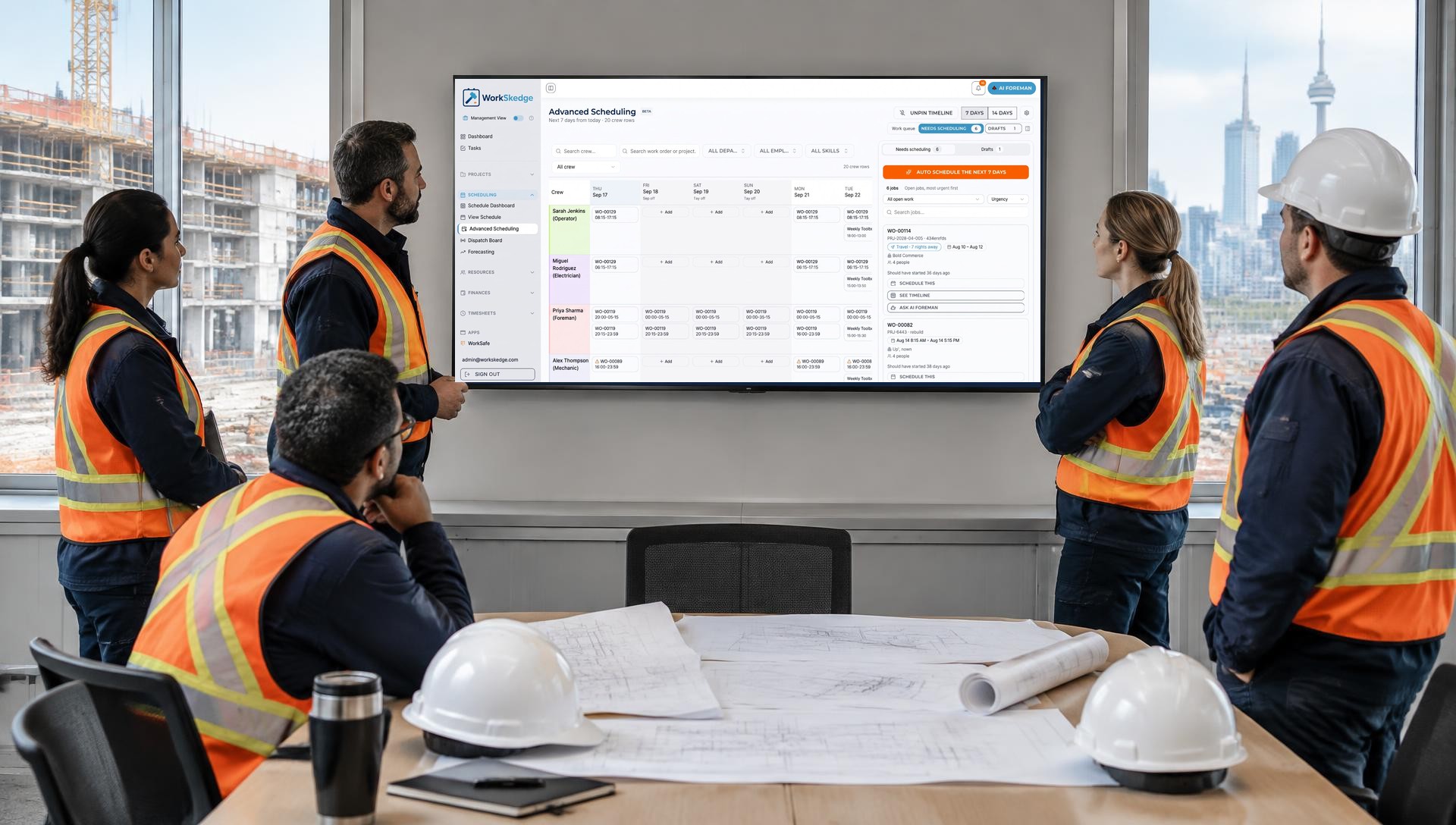
Advanced Scheduling gives operations a 7–14 day crew-by-day horizon for work that needs a scheduling decision. Dispatchers can pull from the unscheduled queue, build draft plans or scenarios for multi-day work, review conflicts, and commit the schedule in one controlled step.
- Fill the next two weeks from work that still needs a decision
- Create draft schedule scenarios before crews are notified
- Commit approved plans with conflict re-checks
Crew intelligence
Put the right crew on the right work order
Construction scheduling breaks when the calendar only knows who is open. WorkSkedge tracks skills, certifications, licenses, qualifications, approved time off, roles, departments, crew compatibility, crew composition, equipment familiarity, same-day continuity, and preferred pairings so assignment decisions reflect the job in front of you.
- Highlight people with the required skills or certifications
- Warn when no qualified employee is available
- Rank crew candidates using availability, skill coverage, history, equipment familiarity, continuity, and pairing rules
Customer communication
Confirm dates and send reminders without another call list
WorkSkedge can send customer SMS reminders at chosen times before the start, respect quiet hours and opt-outs, and support email reminders with separate timing. Two-way rescheduling lets customers reply to offered appointment slots, ask for different dates, or request a call from the dispatcher.
- Send booking confirmations, day-before reminders, SMS reminders, and email reminders
- Re-check availability when a customer picks a time
- Open a call request when the customer asks for help or the system cannot classify the reply

AI Foreman drafts
Let AI Foreman draft the plan, then keep humans in control
Eric, the AI Foreman, can read the current schedule, disruptions, crew scorecards, and unscheduled work to draft schedule plans. Those drafts are reviewed and committed by a person, so the system helps with long-horizon planning without changing the schedule on its own.
- Use current schedule and disruption context as planning inputs
- Draft scenarios for human review
- Keep final schedule changes under dispatcher control

Operations platform
Connect scheduling to the work and the business behind it
WorkSkedge is a construction operating system, not a disconnected scheduling calendar. Advanced Dispatch connects with projects, work orders, employee management, time tracking, purchase orders, vendors, customers, reports, job costing, and project forecasting so staffing decisions carry forward into daily execution and long-range workforce planning.
- Tie assignments to work orders and field details
- Compare scheduled work with actual time and job cost
- Use forecasting to plan team demand beyond this week
Scheduling connected to construction operations
The schedule is useful because it sees the crew, the work, the customer, and the cost context behind each assignment.
Advanced Dispatch
Optional dispatch command center for daily operations, disruption logging, recovery decisions, and crew visibility.
Draft before commit
Build schedule scenarios for multi-day work, review conflicts, and commit only when the plan is ready.
Crew rules
Use always-pair, never-pair, supervision, composition, department, skill, and certification rules to protect job fit.
Customer texting
Send reminders, offer appointment slots, respect quiet hours and opt-outs, and route call requests back to dispatch.
Work orders and time
Assignments stay connected to the work order, field updates, timesheets, job costing, and reporting.
Forecasting
Use near-term plans and workforce records to understand demand beyond today’s emergency.
How construction scheduling automation works in WorkSkedge
Use one controlled process instead of rebuilding the board job by job.
- 01
Read the work
Start with scheduled work, unscheduled work, customer dates, crew records, time off, and job requirements.
- 02
Draft the plan
Build a 7–14 day scenario using crew composition, pairing rules, skills, departments, and availability.
- 03
Resolve exceptions
Review blocked work, conflicts, missing qualifications, disruption signals, and customer timing issues.
- 04
Commit and communicate
Publish approved assignments, update the field, and send confirmations or reminders to customers.
How WorkSkedge pricing works
Prices are per team, not per seat. Operate is a flat $99/mo for up to 5 users, $179/mo up to 10, and $299/mo up to 20 — then $9 per additional user per month. Figures quoted on this page use the bundle noted next to them. See the full ladder for your team size.
Construction scheduling software questions
What is construction scheduling software?+
Construction scheduling software helps contractors plan who works where and when. A construction-specific system connects the schedule to work orders, crew qualifications, employee availability, field updates, timesheets, job costs, customer reminders, and forecasting instead of stopping at a basic calendar.
How does WorkSkedge handle day-of scheduling disruptions?+
The Live Dispatch Board lets dispatch capture sick calls, no-shows, material delays, permit holds, weather issues, and equipment breakdowns as disruption signals. Those signals flag affected work so the team can review available crew, conflicts, and recovery options.
Can AI Foreman automatically change the schedule?+
No. AI Foreman can draft schedule plans using the current schedule, disruptions, crew scorecards, and unscheduled work, but a person reviews and commits the plan before anything changes.
What is the difference between the Live Dispatch Board and Advanced Scheduling?+
The Live Dispatch Board is for day-of control: crew lanes, live statuses, available people, and disruption capture. Advanced Scheduling is for the 7–14 day horizon: unscheduled work, draft scenarios, crew-by-day planning, and conflict re-checks before committing.
Can WorkSkedge match crews by skills, certifications, and pairing rules?+
Yes. WorkSkedge can use skills, certifications, licenses, qualifications, time off, roles, departments, crew compatibility, crew composition, equipment familiarity, same-day continuity, and preferred pairings when ranking crew candidates.
Can WorkSkedge text customers about schedule dates?+
Yes. WorkSkedge supports booking confirmations, customer SMS reminders, email reminders, quiet hours, opt-outs, offered appointment slots, and call-request fallback when a customer needs a dispatcher.
Does WorkSkedge support 7–14 day construction planning?+
Yes. Advanced Scheduling provides a 7–14 day crew-by-day horizon where teams can fill the unscheduled queue, build draft plans, review exceptions, and commit the schedule when ready.
How does scheduling connect to work orders, timesheets, and forecasting?+
Scheduled assignments stay tied to work orders and field details, then feed daily time workflows and job-cost visibility. Forecasting helps leaders compare expected work with the team capacity and skills needed to deliver it.
Help Center
Verify the construction scheduling workflow
Use these product guides to review live dispatch, draft planning, conflicts, and qualified crew assignment.
- Build and commit a draft scheduleCreate a proposed 7–14 day plan, review it for conflicts, and commit it when the crew plan is ready.Read the guide
- Use the live dispatch boardSee day-of crew lanes, live assignment status, available crew, and work that needs dispatch attention.Read the guide
- Resolve scheduling conflictsWork through double-bookings, time-off overlaps, missing qualifications, and other exceptions before crews are notified.Read the guide
- Reschedule or reassign a jobMove work when sick calls, materials, weather, site conditions, or customer timing force the plan to change.Read the guide
- Skills and certifications in schedulingUse qualifications, certification records, and employee availability to assign the right people to the work.Read the guide
Keep exploring
AI Scheduler
Automated dispatch that drafts the next two weeks and recovers the day when work slips.
Crew scheduling software
Build qualified teams and protect billable crew time.
Contractor scheduling software
Make scheduling repeatable for specialty contractors and subcontractors.
Construction software
See how scheduling connects to field and financial operations.

No surprises. No daily chaos. No sweat.
Use construction scheduling software that can plan the next two weeks, recover from disruption, keep customers informed, and leave the final call with your team.
Launch Your Demo