
Close or reopen a project
Short answer
Close Project lives in the "..." actions menu on the project header. If work orders are still open WorkSkedge lists them and blocks a silent close — you either close them individually or tick the acknowledgement and force-close, which closes every open work order with the project.
On this page
Steps
- 1Open the project you want to close.
- 2Click the "..." actions menu beside Edit on the project header.
- 3Choose Close Project.
- 4Review any open work orders listed in the dialog.
- 5Either cancel and close those work orders individually, or tick the acknowledgement box.
- 6Click Close Project Anyway to force-close, which also closes every listed work order.
- 7To bring the project back, use Reopen from the same actions menu.
Close a project
Open the project, click the "..." menu beside Edit, and choose Close Project.
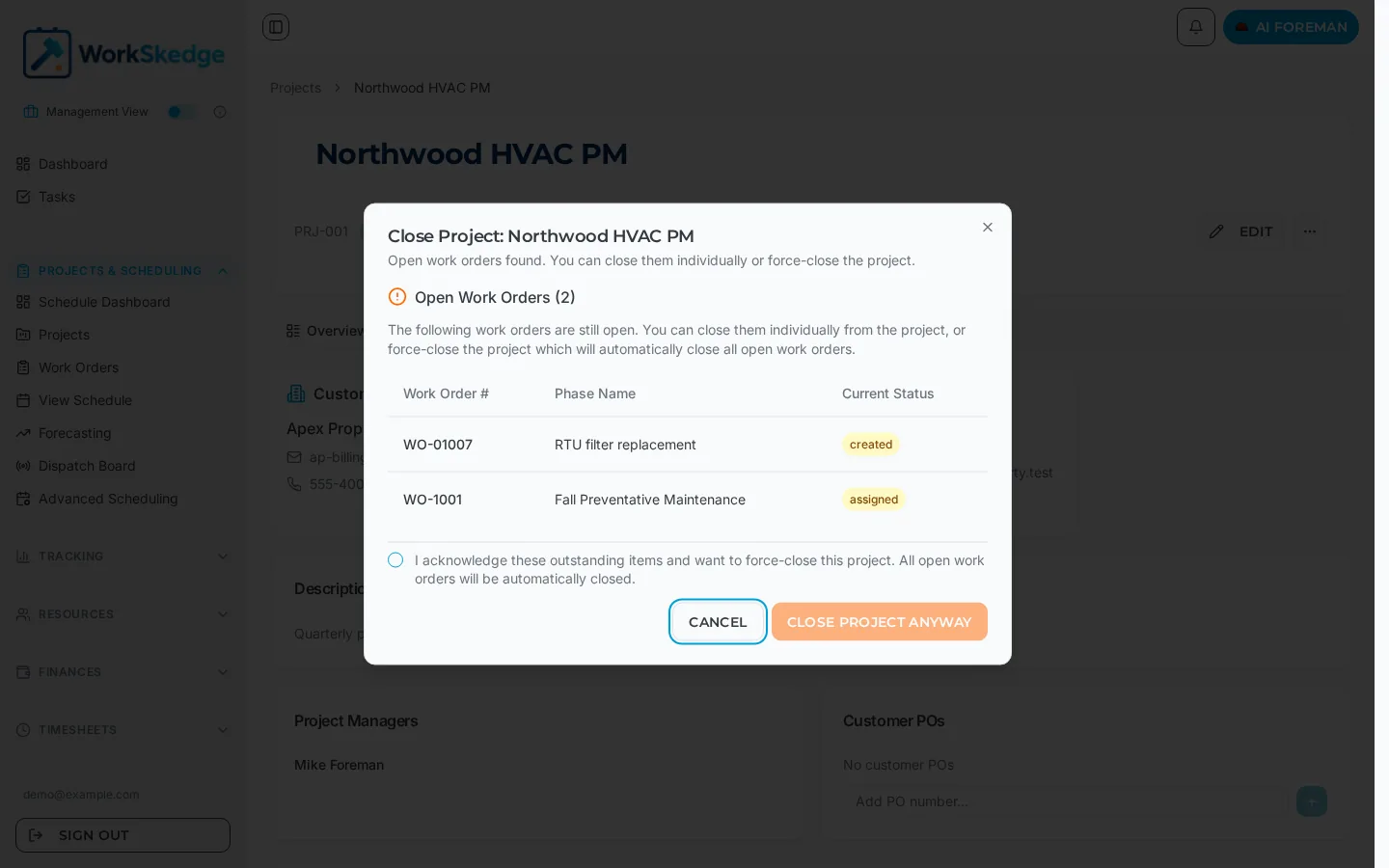
If everything under the project is already resolved, the project closes. If not, WorkSkedge opens a Close Project dialog that names the problem instead of failing quietly.
The open work orders warning
The dialog lists every open work order with its number, phase name and current status — for example created or assigned. You have two options:
- Cancel, close those work orders individually from the project's Work Orders tab, then close the project. This is the clean path and keeps each work order's completion record accurate.
- Tick "I acknowledge these outstanding items and want to force-close this project" and click Close Project Anyway. Every open work order is automatically closed with the project.
The force-close button stays disabled until the acknowledgement box is ticked, so nobody closes a live job by reflex.
Before you force-close
Force-closing is the right call for jobs that were abandoned, duplicated or superseded. For finished work, check first that:
- field labour is submitted and approved on timesheets,
- vendor and material costs are recorded against the job,
- the final invoice has been raised.
Closing does not invoice anything for you.
Reopen a project
Reopen from the same "..." actions menu. In Simple Status Mode, creating a work order against a closed project also reverts it to active — reopen deliberately from the menu instead, so the change is intentional and shows in the Activity tab.
Troubleshooting
"Cannot close project - incomplete work orders". The validation dialog lists every work order that is still open. Close each one, confirm they all show as closed, then retry the project closure. This check exists so costs and reports cannot land on a project that is already closed.
You need to change something on a closed project. Reopen it first — closed projects are read-only. Reopening restores normal editing and lets you close it again afterwards.
Frequently asked questions
Why is the Close Project Anyway button greyed out?
You have not ticked the acknowledgement checkbox yet. The force-close button stays disabled until you confirm you understand the listed work orders will be closed automatically.
What happens to open work orders when I force-close?
They are all closed with the project. That is why the dialog lists them with their current status before you confirm.
Does closing a project invoice the outstanding work?
No. Closing is a status change only. Raise the final invoice and approve outstanding timesheets before you close.
Can a closed project be reopened?
Yes, from the same "..." actions menu on the project header. Reopen deliberately rather than relying on the side effect of creating a new work order.
Was this article helpful?
Still stuck?
Send us the article name and what you expected to happen.
Last verified September 1, 2026