
What do the invoice statuses mean (Draft, Sent, Viewed, Partial, Paid, Void)?
Short answer
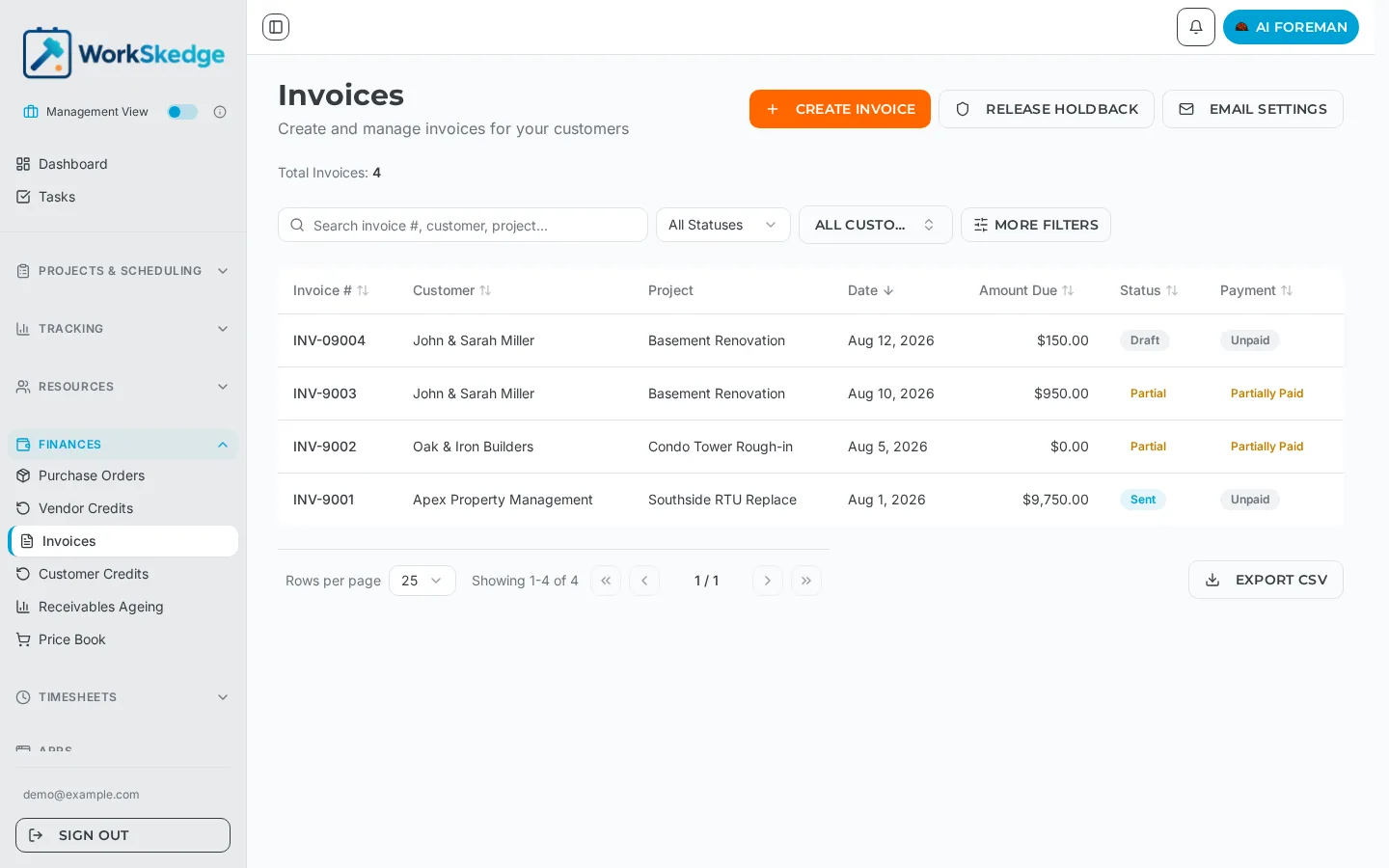
Invoices move through Draft, Sent, Viewed, Partial, Paid and Void. Draft is fully editable, Sent limits editing, Viewed means the customer opened it, and Partial and Paid are set automatically by WorkSkedge when payments are recorded. Void cancels an invoice while keeping the audit trail.
On this page
Steps
- 1Open Finances > Invoices in the sidebar.
- 2Read the Status column for the workflow state and the Payment column for the money state.
- 3Open an invoice to see both badges at the top, next to the Download PDF, Edit, Resend and Void buttons.
- 4Record a payment to move the invoice to Partial or Paid automatically.
- 5Use Void to cancel an invoice you cannot send — it is preserved, not deleted.
The six invoice statuses
| Status | What it means |
|---|---|
| Draft | Created but not yet sent. Fully editable. |
| Sent | Delivered to the customer. Editing is limited. |
| Viewed | The customer has opened the invoice. |
| Partial | One or more payments received, balance still outstanding. |
| Paid | Fully paid — amount paid is greater than or equal to the total. |
| Void | Cancelled. The record is preserved rather than deleted. |
The invoice list shows two columns: the Status badge above, and a separate Payment badge (Unpaid, Partially Paid, Paid) so you can scan money and workflow separately.
What WorkSkedge changes for you
You never set Partial or Paid by hand. When a payment is recorded, WorkSkedge recalculates the invoice's amount paid, balance due and payment status, then moves the status: a part payment makes it Partial, a payment that clears the balance makes it Paid. Applying a customer credit that settles the invoice in full does the same thing as cash — see Apply credits to an invoice.
Void instead of delete
Void is on the invoice header next to Download PDF, Edit and Resend. Voiding cancels the invoice without erasing it, so the invoice number stays used and the history stays intact. Voiding also releases any vendor credits attached to the invoice back to open so they can be used again.
Resending after edits
Sending an invoice again after changes marks it as revised and increments the invoice's revision count, so both you and the customer can tell a corrected copy from the original.
Status reference
| Status | What it means |
|---|---|
| Draft | Created but not sent. Fully editable. |
| Sent | Delivered to the customer. Editing is limited. |
| Viewed | The customer has opened the invoice. |
| Partial | At least one payment received, balance still owing. |
| Paid | Amount paid is equal to or greater than the total. |
| Void | Cancelled. Kept for the audit trail rather than deleted. |
Status changes follow payments automatically: a partial payment moves the invoice to Partial, and a full payment moves it to Paid. Voiding is how you cancel an invoice — nothing is deleted, so the history stays intact.
Frequently asked questions
Can I edit an invoice after it has been sent?
Editing is limited once an invoice is Sent. If you make changes and send again, WorkSkedge marks the invoice as revised and increments its revision count.
Why did my invoice change to Partial on its own?
Because a payment was recorded against it. WorkSkedge recalculates amount paid, balance due and payment status every time a payment is added or removed.
Should I delete an invoice or void it?
Void it. Voiding cancels the invoice while preserving the audit trail and the invoice number, and it returns any applied vendor credits to open.
What is the difference between Status and Payment on the invoice list?
Status is the workflow state (Draft, Sent, Viewed, Partial, Paid, Void). Payment is the money state (Unpaid, Partially Paid, Paid). A Sent invoice can still be Unpaid.
Was this article helpful?
Still stuck?
Send us the article name and what you expected to happen.
Last verified September 1, 2026