
How does holdback (retainage) work on invoices?
Short answer
Set a default holdback percentage in Finance Settings and WorkSkedge withholds it on every new invoice, showing it as a holdback line on the invoice and the PDF. Withheld amounts build up as the project holdback balance — issued invoices only, not drafts — and you bill them later with Release Holdback on the Invoices page.
On this page
Steps
- 1Open Settings > Finance Settings and select the Holdback / Retainage tab.
- 2Set the jurisdiction, default percentage, release days, terminology and tax method.
- 3Create invoices as usual — the percentage is withheld and shown as a holdback line.
- 4Issue the invoices; only issued invoices add to the project holdback balance.
- 5When the job qualifies, open Finances > Invoices and click Release Holdback to bill the accumulated balance.
Settings
Holdback lives in Finance Settings under the Holdback / Retainage tab.
| Field | What it does |
|---|---|
| Jurisdiction | Regional rules applied to holdback handling |
| Default percentage | Percentage withheld on new invoices |
| Release days | Days after substantial completion before holdback is releasable |
| Terminology | Whether the app and PDFs say "Holdback" or "Retainage" |
| Tax method | Whether holdback is computed pre-tax or post-tax |
How the money flows
- An invoice on a project with holdback enabled withholds the configured percentage and shows it as a holdback line on the invoice and PDF.
- Withheld amounts accumulate as the project's holdback balance. Only issued invoices count — drafts do not.
- When the job qualifies, click Release Holdback on the Invoices page to bill the accumulated balance. The release invoice draws the balance down.
Pre-tax vs post-tax
The tax method decides whether holdback is taken before or after tax, and it changes the totals block:
Pre-tax (typical in Canada)
taxable base = subtotal - holdback
tax          = taxable base x tax rate
total        = taxable base + tax   <- this is the amount due
Post-tax (typical in the US)
tax        = subtotal x tax rate
total      = subtotal + tax
amount due = total - holdback
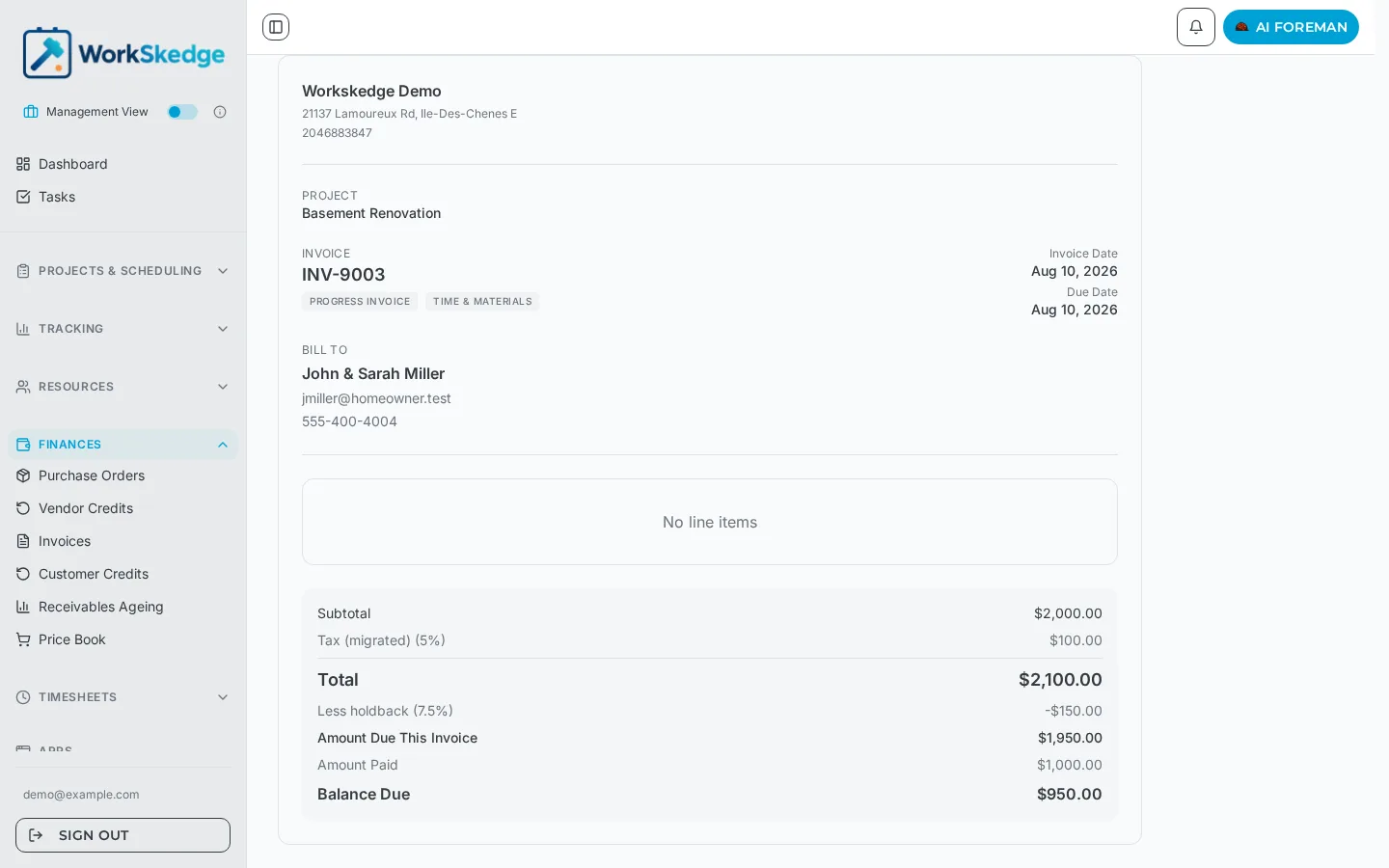
On the invoice this reads as Subtotal, Tax, Total, then Less holdback (%) and Amount Due This Invoice, followed by Amount Paid and Balance Due.
Practical notes
- The holdback label is customisable, so the invoice can print "Holdback", "Retainage" or "Retention" to match your contracts.
- Holdback is included in the PDF and in the invoice data sent to connected apps and accounting integrations.
- Payments are tracked against the amount due, not the withheld portion — the balance due never includes holdback that has not been released.
Frequently asked questions
Do draft invoices add to the holdback balance?
No. Only issued invoices count toward the project's holdback balance.
Why does my total look different from subtotal plus tax?
You are on the pre-tax method. Holdback is deducted before tax is calculated, so the stored total already excludes the withheld amount.
Can I call it retainage instead of holdback?
Yes. The terminology setting changes the wording throughout the app and on the PDFs, including the settings tab name.
How do I bill the money that was held back?
Use Release Holdback on the Invoices page to create a release invoice, which draws down the accumulated holdback balance.
Was this article helpful?
Still stuck?
Send us the article name and what you expected to happen.
Last verified August 31, 2026