
How do I find overdue invoices and chase what I am owed?
Short answer
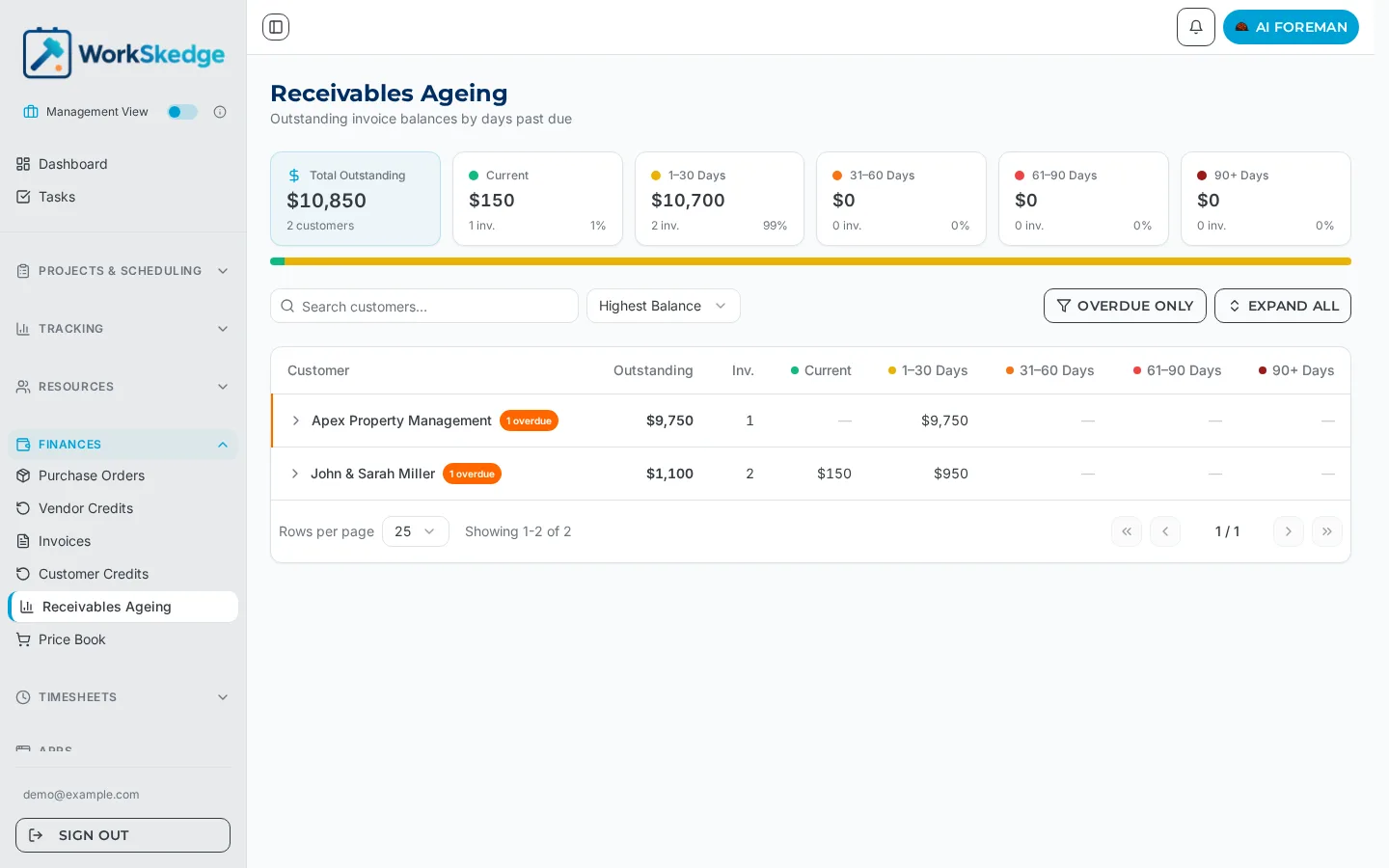
Open Finances > Receivables Ageing. It shows your total outstanding balance split into Current, 1-30, 31-60, 61-90 and 90+ days past due, with a row per customer so you can see who owes what and how late it is.
On this page
Steps
- 1Open Finances > Receivables Ageing in the sidebar.
- 2Read the summary tiles for the split across Current, 1-30, 31-60, 61-90 and 90+ days.
- 3Turn on Overdue only to hide customers who are current.
- 4Sort by Highest Balance, or scan the 90+ column for the oldest debt.
- 5Use Expand all to see the individual invoices behind a customer balance.
- 6Open the invoice from Finances > Invoices to resend it or record the payment.
What the report shows
The Receivables Ageing page opens with a summary strip:
- Total Outstanding and the number of customers it covers
- One tile per bucket — Current, 1-30 Days, 31-60 Days, 61-90 Days and 90+ Days — each with the dollar amount, the invoice count and the share of the total
Below that is a table with one row per customer showing outstanding balance, invoice count, an overdue badge, and the amount sitting in each bucket.
Working the list
- Overdue only hides customers who are current, so you are looking at collection work rather than healthy accounts.
- Expand all opens the customers to show the individual invoices behind each balance.
- Sort by Highest Balance to chase the biggest money first, or work the 90+ column when age matters more than size.
From the report to the invoice
Once you know who to chase, open the invoice from Finances > Invoices to resend it or record what has come in. Recording a payment updates the balance and moves the invoice to Partial or Paid automatically — see What do the invoice statuses mean and How do I record a payment against an invoice.
Not the same as the Ageing Report
There are two ageing views in WorkSkedge and they answer different questions:
| Page | Where | Question it answers |
|---|---|---|
| Receivables Ageing | Finances | Who owes me money and how late is it? |
| Ageing Report | Reports | How long are work orders sitting in each status? |
The Reports version is a workflow and operations report about time in stage — it has nothing to do with unpaid invoices.
Frequently asked questions
Which buckets does the receivables ageing use?
Current, 1-30 days, 31-60 days, 61-90 days and 90+ days past due, each with a dollar amount, invoice count and share of the total outstanding.
How do I see the individual invoices behind a customer total?
Use Expand all, or expand the single customer row you are chasing.
Is the Ageing Report under Reports the same thing?
No. That report tracks how long work orders spend in each workflow status. Outstanding invoice balances live in Finances > Receivables Ageing.
Does the report update when I record a payment?
Yes. Payments recalculate the invoice balance due, so the customer's outstanding amount and bucket update with it.
Was this article helpful?
Still stuck?
Send us the article name and what you expected to happen.
Last verified August 31, 2026