
How do skills and certifications decide who gets offered a job?
Short answer
Skills and certifications recorded on each employee drive who WorkSkedge offers for a work order, and expired or unverified certs are flagged before you assign.
On this page
Skills live on the employee record, not on the schedule. When a work order lists required skills, scheduling filters and highlights the people who actually hold them, so a licensed job never quietly goes to someone unqualified.
Before you start
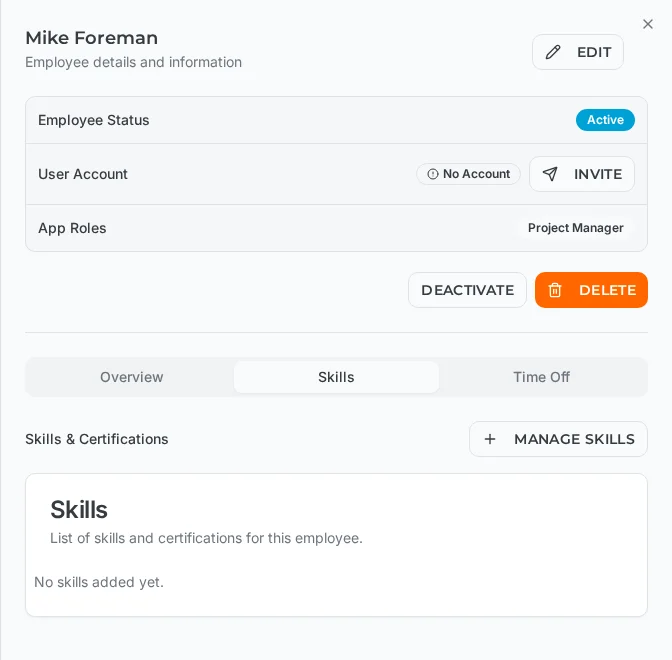
You need employee management access to add or verify skills. Skills are recorded per employee under Resources > Employees > (employee) > Skills, then reused everywhere scheduling happens.
Steps
- 1Open Resources > Employees and select the employee
- 2Switch to the Skills tab
- 3Click Manage Skills to pick from your company skill library
- 4Record the certification number, issue date and expiry date
- 5Have a manager mark the skill Verified once documentation is reviewed
- 6Add the required skills to the work order so scheduling can match on them
What to fill in
Each skill entry carries:
- Skill name — e.g. "Master Electrician License"
- Category — Trade, Safety, Equipment, Software or Other
- Certification or licence number (optional)
- Issue date and expiry date (leave expiry empty when the skill never expires)
- Verified — set by a manager after reviewing the certificate
- Notes — endorsements, restrictions, conditions
How matching works
When you schedule a work order that specifies required skills:
- Employees holding the required skills are highlighted.
- Employees with an expired relevant certification are excluded.
- Unverified skills carry a warning indicator, so a self-reported cert is never mistaken for a checked one.
- If nobody qualifies, the system warns you rather than silently offering the wrong person.
On the Dispatch Board, missing skills are a warning, not a hard block — a dispatcher can still assign someone by hand, but must type a reason, and that reason is stored on the audit trail.
Notes and limits
- Expiry dates are tracked so certifications coming due appear as dashboard warnings; renewing means updating the expiry date and cert number, or adding a new entry to keep history.
- Crew rules are separate from skills: a never pair rule is a hard block that cannot be overridden from the board, and a never schedule rule removes someone from every automatic pick.
Frequently asked questions
Does a missing skill stop me from assigning someone?
No. Missing skills, time-off overlaps and double-bookings are warnings — the dispatcher can proceed, but must type a reason, which is recorded on the audit trail. Crew rules such as never pair are hard blocks.
What happens when a certification expires?
Employees with an expired relevant certification are excluded from skill-matched suggestions. Update the expiry date and certificate number on renewal, or add a new skill entry to preserve history.
What is the difference between a skill and a verified skill?
Anyone can have a skill recorded. Verified means a manager reviewed the certificate or licence. Unverified skills show a warning indicator and can optionally be excluded from matching.
Which skill categories exist?
Trade, Safety, Equipment, Software and Other — covering licensed trades, safety tickets such as OSHA or first aid, equipment operation such as forklift or aerial lift, software proficiency, and anything custom.
Can I see who is qualified before I build a schedule?
Yes. Scheduling filters available employees by required trade, and warns when no qualified employee is free for the dates you picked.
Was this article helpful?
Still stuck?
Send us the article name and what you expected to happen.
Last verified August 31, 2026