
Deactivate an employee who leaves
Short answer
What to do when somebody leaves: deactivate the record instead of deleting it, so their history on projects, work orders and timesheets stays intact.
On this page
Before you start
Changing employee status is an Administrator or Manager task. Before you deactivate somebody, reassign any work they are still scheduled on - deactivating does not move their assignments for them.
Steps
- 1Open the schedule and reassign or unassign any upcoming work the person is on.
- 2Confirm their outstanding timesheets are submitted and approved.
- 3Reassign anything they own as project manager or site lead.
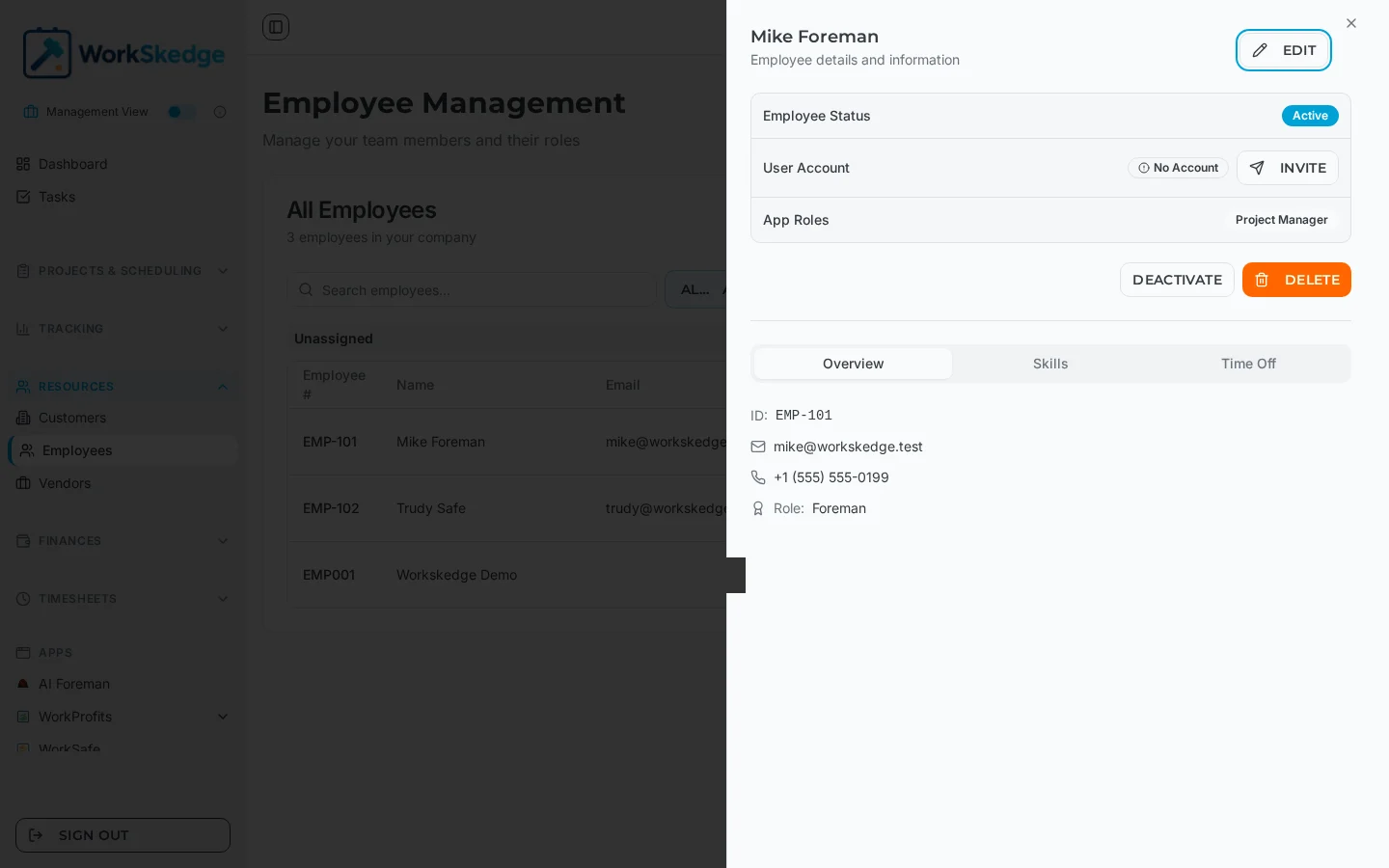
- 4Open Employees under Resources and click the person.
- 5Set their employee status to inactive.
- 6Revoke their user login separately if they had one.
Deactivate, do not delete
Employees are deactivated rather than erased. WorkSkedge keeps the record so that everything attached to it still makes sense:
- their assignments and history on past projects and work orders
- submitted timesheets and the labour cost already posted against jobs
- progress reports, notes and media they filed from the field
- their skills and certification history
Deactivating also removes them from the pickers used for new assignments, so nobody accidentally schedules a person who has left.
Order of operations
- Reassign or unassign any upcoming scheduled work.
- Make sure outstanding timesheets have been submitted and approved.
- Hand over anything they own as project manager or site lead.
- Deactivate the employee record.
- Revoke their login separately if they had a user account.
Notes and limits
- A deactivated record can be reactivated - useful for seasonal crews and rehires, who keep their existing number and history.
- Historical reporting still includes deactivated employees for the periods they worked, so past labour cost and utilisation figures do not change.
- Deactivating the employee record and removing their app login are two separate things. Do both when the person is leaving for good.
Common errors
- They still show on the schedule - deactivation does not clear existing assignments. Open the affected jobs and reassign.
- Their name is gone from the assignment dropdown - expected. Reactivate the record if you need to schedule them again.
Frequently asked questions
Should I delete an employee who quit?
No. Deactivate them. Deleting would orphan the timesheets, assignments and reports tied to their record.
Does deactivating remove their past timesheets?
No. Submitted time and the labour cost already posted to jobs stay exactly as they were.
Can a deactivated employee be brought back?
Yes. Reactivate the record and they keep their employee number, skills and history - handy for seasonal crews.
Does deactivating end their app access?
Not by itself. The employee record and the user login are separate; revoke the login as well when the person is leaving.
What happens to jobs they were already scheduled on?
Those assignments remain until you change them, so reassign upcoming work before deactivating.
Was this article helpful?
Still stuck?
Send us the article name and what you expected to happen.
Last verified August 31, 2026