
What are apps and integrations in WorkSkedge?
Short answer
Apps extend WorkSkedge with extra capability — safety, asset tracking, financial reporting, accounting sync — without leaving your workspace. They are installed from the App Catalog and share your live projects, employees and schedules.
On this page
Apps are add-ons that extend WorkSkedge and run against your live data. You browse and install them from Apps → App Catalog in the left sidebar. Some apps are embedded — they open inside WorkSkedge as their own screen — and others are headless and simply sync data in the background. Every app you install gets its own credentials, its own set of read/write permissions, and its own list of events it listens for, so you always know exactly what an app can see and do.
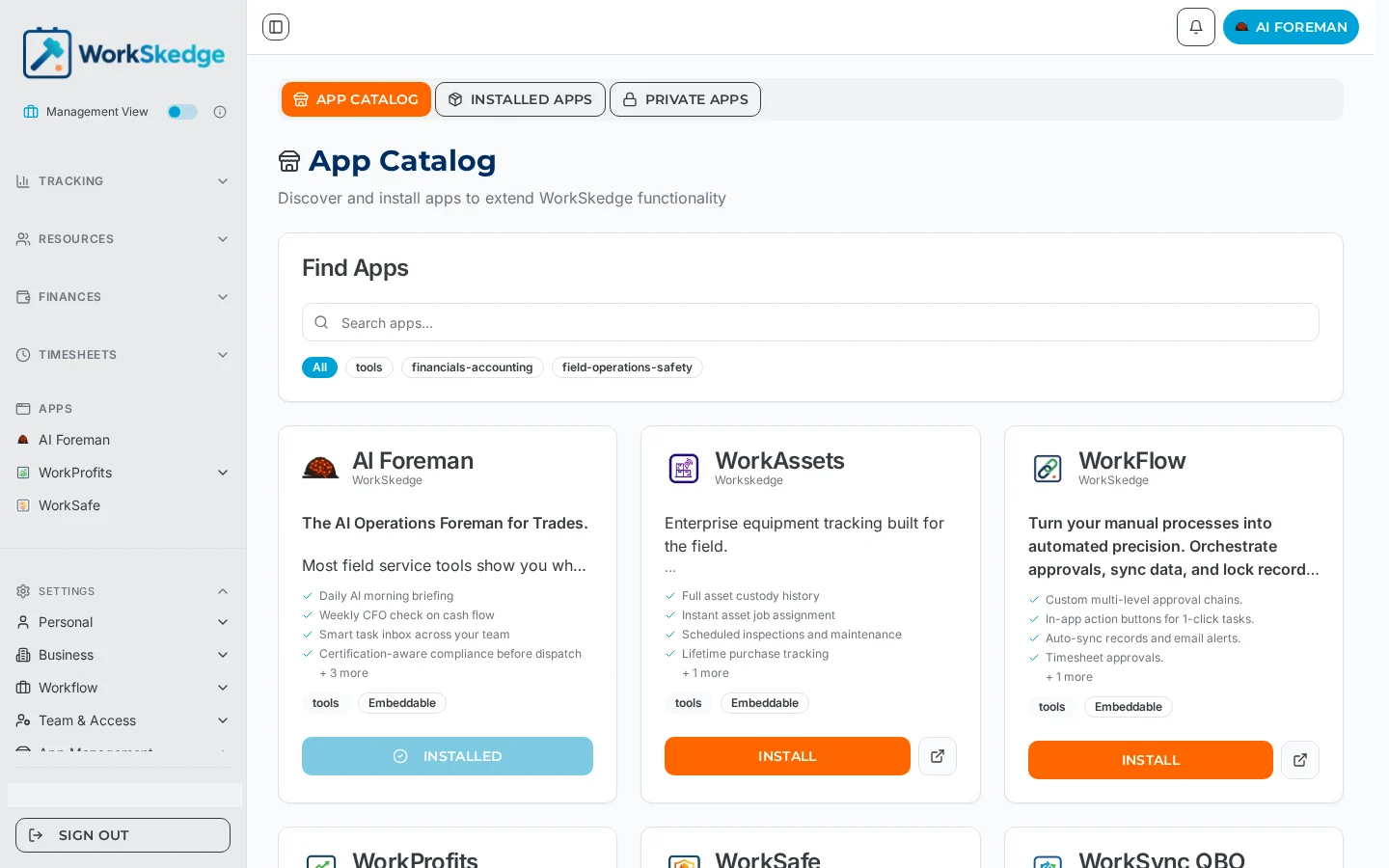
What you get in the Apps area
The Apps area has three tabs:
- App Catalog — everything available to install, searchable and filtered by category (
tools,financials-accounting,field-operations-safety). - Installed Apps — what your company is running today, with counts for Total Installed, Active Apps and Inactive Apps.
- Private Apps — apps built for your company only rather than published to the public catalog.
Installed embedded apps also appear as their own entries under APPS in the left sidebar, so opening one is a single click from anywhere in WorkSkedge.
Embedded apps vs headless apps
| Type | How you use it |
|---|---|
| Embedded | Opens inside WorkSkedge (the catalog card is tagged Embeddable / Embedded). It already knows who you are, your company and the record you came from. |
| Headless | No screen of its own. It reacts to events and reads or writes through the WorkSkedge API — accounting sync is the classic example. |
Notes and limits
- Installing an app grants it the permissions shown during install and gives it API credentials scoped to your company only.
- Each install tracks its own webhook subscriptions; the Installed Apps card shows how many events an app is listening for.
- Apps can be free or paid. The install wizard tells you which before anything is created.
- An app can be switched off without being removed — see Turn an app off, or uninstall it completely.
Frequently asked questions
Where do I find apps in WorkSkedge?
In the left sidebar under Apps. The App Catalog tab lists what you can install, Installed Apps shows what you are running, and Private Apps holds apps published to your company only.
Do apps see all of my data?
No. Each app is granted a specific list of read, write and delete permissions per data type — for example Projects: Read, Equipment: Read/Write/Delete. The install wizard shows the full list before you confirm.
What does the Embeddable tag mean on a catalog card?
It means the app has its own screen that opens inside WorkSkedge instead of sending you to an external site.
Are apps included in my plan?
Some are free and some are paid. The last step of the install wizard states the price, or confirms that the app is free to install with no payment required.
Can I build an app for my own company only?
Yes — private apps are installed for your company without being published to the public catalog.
Was this article helpful?
Still stuck?
Send us the article name and what you expected to happen.
Last verified September 1, 2026