
How do I turn an app off or uninstall it?
Short answer
Switch off App is Active to cut an app's access while keeping the install, or uninstall it to remove the installation and revoke its credentials.
On this page
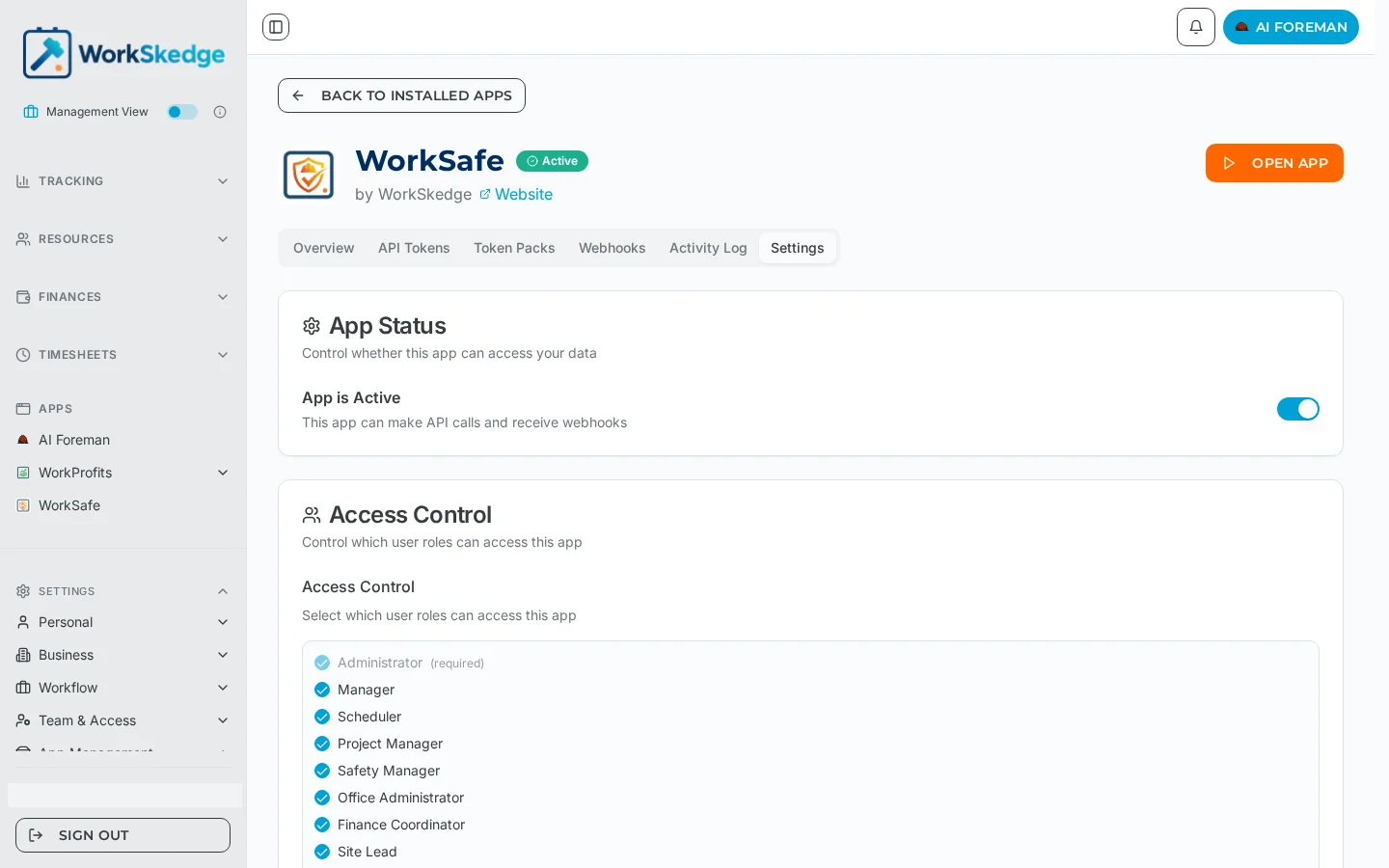
You have two options. To pause an app, open Apps → Installed Apps → View Details → Settings and switch off App is Active — the app can no longer make API calls or receive events, but the installation stays in place and can be switched back on. To remove it for good, uninstall the app from the same Installed Apps area; WorkSkedge then ends the installation, revokes the credentials that were issued to it, and notifies the app that it was uninstalled so it can clean up on its side.
Before you start / permissions
- Administrator switches apps off and uninstalls them.
- If the app is your accounting or safety integration, expect syncing to stop immediately — check with whoever relies on it first.
- Deactivating is the safer, reversible option; prefer it while you are troubleshooting.
Steps
- 1Open Apps → Installed Apps.
- 2Click View Details on the app and open the Settings tab.
- 3Switch off App is Active to pause the app, keeping the install.
- 4To remove the app entirely, uninstall it from Installed Apps.
- 5Confirm — credentials are revoked and the app is notified.
Steps
- Open Apps → Installed Apps.
- Click View Details on the app, then the Settings tab.
- To pause it: switch App is Active off. Its card moves to the Inactive Apps count.
- To remove it: uninstall the app from the app''s management options.
- Confirm. The app''s credentials stop working and the app is told the install has ended.
Notes and limits
- Records the app created inside WorkSkedge (invoices, safety forms, equipment entries) stay in WorkSkedge after an uninstall.
- Data the app stored on its own servers is governed by that vendor''s policy, not WorkSkedge.
- Reinstalling later creates a brand-new installation with new credentials — the old ones are never reused.
- Apps installed during a training session are uninstalled automatically when the session ends; that is expected and does not affect production installs.
Common errors
- Sync stopped without anyone uninstalling — check App Status; an app that was switched off looks installed but is inactive.
- The app still shows in the sidebar — reload WorkSkedge; the sidebar list refreshes on load.
- You want the data the app held — export it from the app before uninstalling; revoking credentials cuts its access immediately.
Frequently asked questions
What is the difference between deactivating and uninstalling?
Deactivating keeps the installation but blocks API calls and webhooks, and is reversible with one toggle. Uninstalling ends the installation and revokes the app's credentials.
Do I lose data when I uninstall an app?
Records the app created inside WorkSkedge remain in WorkSkedge. Anything the app stored on its own servers is up to that vendor, so export first if you need it.
Does the app know it was uninstalled?
Yes. WorkSkedge sends the app an uninstall notification so it can clean up its copy of your installation.
Can I reinstall the same app later?
Yes. It installs as a new installation with new credentials; the old ones are never reused.
Why did an app disappear after a training session?
Apps installed inside a training session are removed automatically when the session ends. Production installs are unaffected.
Was this article helpful?
Still stuck?
Send us the article name and what you expected to happen.
Last verified September 1, 2026