
How do I receive and bill a purchase order?
Short answer
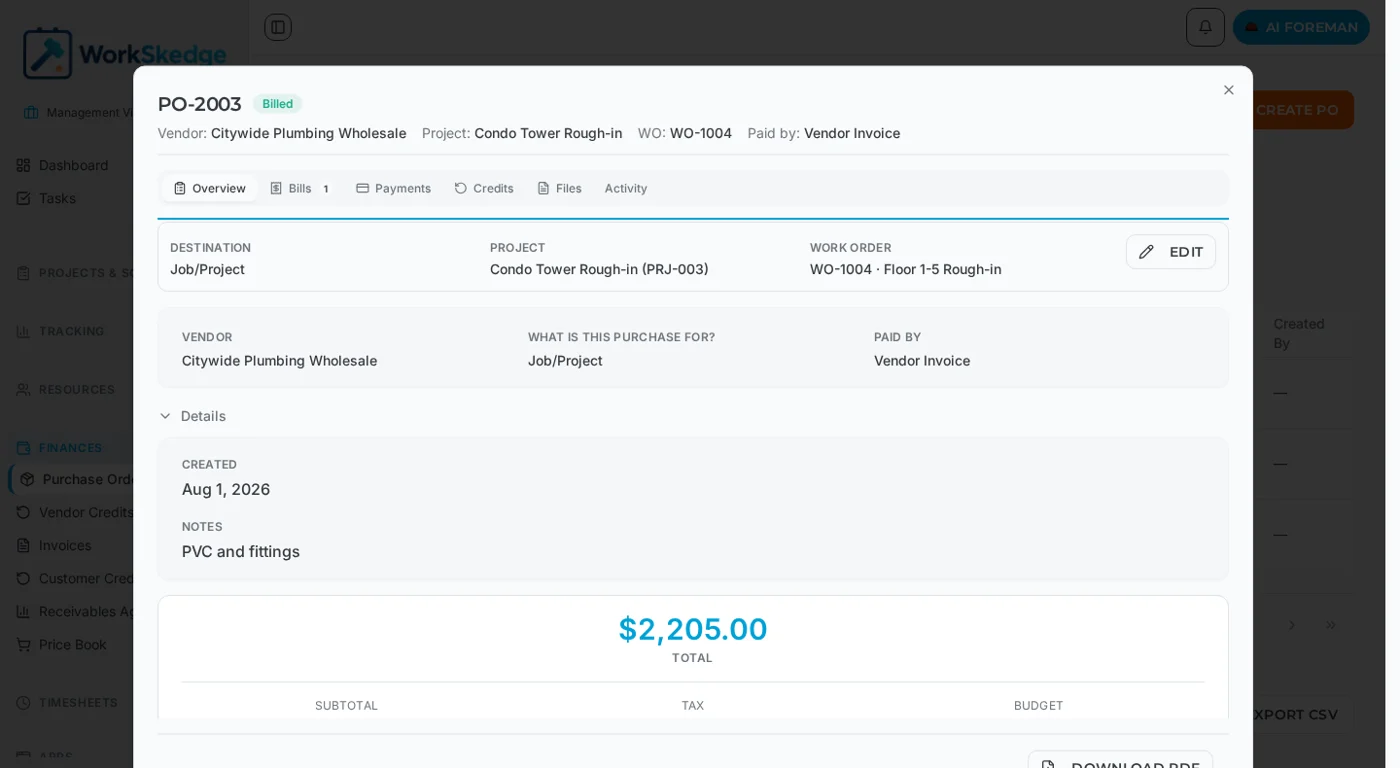
Use Mark Received once the goods arrive, then record the vendor invoice as a bill against the PO. A PO can carry several bills, and it flips to Billed once they total 99% of the PO amount.
On this page
Receiving and billing are two separate steps. Mark Received records that the goods or services arrived and stamps every line item as fully received, along with who received it and when. Billing records a vendor invoice against the PO. You can record more than one bill on the same PO, which is what makes partial shipments, backorders and progress billing work.
Before you start
- The PO must be approved (or already partially received or partially billed).
- The PO total must be greater than $0 before it can be received.
- Receiving is not required before billing — POs in Approved, Partially Received, Received or Partially Billed can all be billed.
Steps
- 1Open the purchase order from Finances → Purchase Orders.
- 2When the goods or services arrive, click Mark Received — or receive only the lines that arrived to leave the PO Partially Received.
- 3When the vendor invoice arrives, open the Bills tab and record a bill with its invoice number, date, amount, line items and taxes.
- 4Record further bills on the same PO for backorders or progress invoices.
- 5Check that the PO has moved to Billed once the bills cover the total.
- 6Open the Payments tab and record each payment with its method and amount.
Receiving
- Mark Received moves the PO to Received and sets every line item to fully received.
- Receiving only some line items leaves the PO in Partially Received.
- Receiving fires the
po.receivedwebhook for anything you have integrated.
Multi-bill support
- First bill — when the vendor invoice arrives, bill the PO. If the billed amount covers the full PO total (within a 1% tolerance) the PO becomes Billed; otherwise it becomes Partially Billed.
- Later bills — record additional invoices against the same PO. Each one is a separate bill record and the totals are re-evaluated every time.
- Fully billed — once the bills add up to 99% or more of the PO total, the PO moves to Billed.
Individual bills can be removed without touching the others. When a bill is removed the PO''s billed total is recalculated and the status may drop back to Partially Billed or Received.
Recording payments
Once a PO is billed you can record payments against it.
| Payment status | Meaning |
|---|---|
| Unpaid | No payments recorded |
| Partially Paid | Some paid, balance remaining |
| Paid | Full amount paid |
| Overpaid | More recorded than was invoiced |
| Closed | Manually closed, no further payments expected |
Payment methods available when recording a payment: Check, ACH/Bank Transfer, Credit Card, Cash, Wire Transfer, Reimbursement and Other.
Notes and limits
- If AI invoice scanning is enabled in finance settings you can scan a vendor invoice to pre-fill the bill, and backordered items are detected automatically.
- Bills carry their own line items and tax lines, so a bill does not have to mirror the PO line for line.
- Removing a bill dispatches the
po.unbilledwebhook.
Common errors
- "Purchase order PO-00123 total must be greater than $0 before it can be marked as received." — the PO has no positive line items. Add or update line items so the total is positive, then receive it again. Mark Received is disabled in the app for $0 POs.
- PO still Partially Billed after the last invoice — the recorded bills total under 99% of the PO. Record the shortfall or correct the PO total.
Frequently asked questions
Can one purchase order have more than one vendor invoice?
Yes. A PO supports multiple bills, each with its own invoice number, date, amount, line items and tax lines. The PO totals are re-evaluated after every bill.
Why can I not mark this PO as received?
Its total is $0. A received PO that can never be billed would be stuck, so WorkSkedge blocks it. Add or update line items so the total is positive and try again.
Can I remove a bill I recorded by mistake?
Yes. Bills are removed individually without affecting other bills on the PO. The billed total is recalculated and the status may revert to Partially Billed or Received.
Which payment methods can I record against a billed PO?
Check, ACH/Bank Transfer, Credit Card, Cash, Wire Transfer, Reimbursement and Other.
What does Overpaid mean?
More money has been recorded against the PO than was invoiced. Correct the payment records, or close the PO if the difference is intentional.
Was this article helpful?
Still stuck?
Send us the article name and what you expected to happen.
Last verified August 31, 2026